PlayTV: Live Sports TV & Shows
- 4.3
- Rating
- 1.00M
- Installs
- Free
- Price

 Analysis by App-foxy
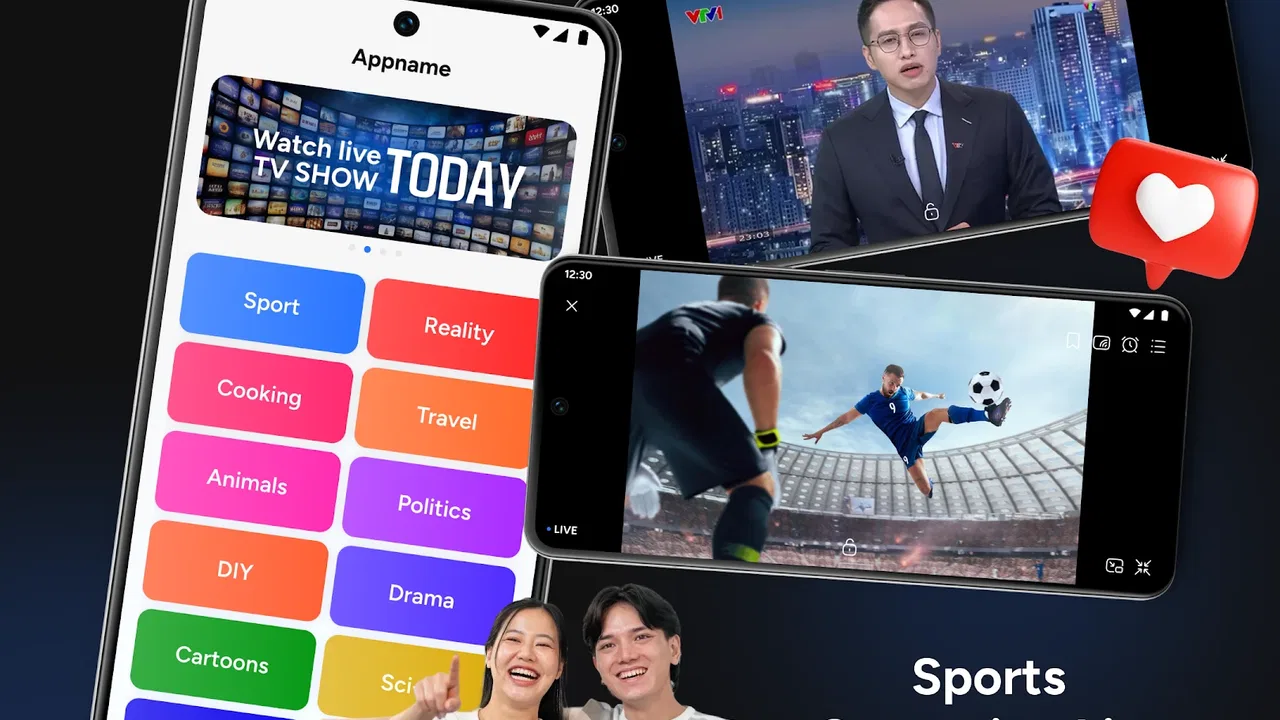
I approached PlayTV: Live Sports TV & Shows as a first-time viewer looking for a simple way to watch television-style content from a phone. The app sits in the video players and editors category, but its practical purpose is much narrower and easier to understand: it brings live television channels, sports broadcasts, movies, and TV shows into one viewing interface. That makes it appealing when I want something ready to play rather than a tool for recording, editing, or publishing my own videos.
My first impression is that PlayTV is best understood as a live-viewing hub, not a replacement for every streaming service on a device. It is free to use, carries an Everyone age rating, and comes from KINGBIOWORLD JOINT STOCK COMPANY. The current release is version 1.0.0, designed for devices running Android 10 or later. Those details matter because the experience depends heavily on whether the phone or tablet is reasonably current and whether the viewer wants live programming instead of a carefully managed personal library.
The app has already attracted more than a million installs and holds a 4.3 average from roughly eight thousand seven hundred ratings. I see that as a useful sign that the basic idea is connecting with viewers, although it is not a guarantee that every channel, program, or device will feel equally smooth. PlayTV was released on January 27, 2026, so I would also approach it as a relatively new viewing option rather than a mature platform with years of accumulated polish.
You May Also Like

 Blood Strike: 2.5 Anniversary
Blood Strike’s Loadouts Turn Every Drop Into a Tactical Gamble
A close look at Blood Strike’s custom loadouts: how fast access to signature weapons reshapes its battle royale rhythm, rewards preparation, and narrows the gap between fights.

 Pandora - Music & Podcasts
Pandora’s Music Is Easy to Start, but Harder to Recover
Pandora’s strength is its low-effort path from a seed to a station. Its weak spot is how much confidence it asks you to place in connection, setup, and quiet recovery.

 8 Ball Pool
 Is Built on Rivalries, Rematches, and Routine
A close look at the rivalries, rematches, shared routines, and unanswered safety questions that turn a quick pool match into a persistent mobile community.

 Samsung Music
’s Quiet Strength Is Playing What You Already Own
Its reach comes less from spectacle than from dependable access to a personal library. That simplicity is both the app’s strongest retention engine and its ceiling.

 AccuWeather: Weather Radar
AccuWeather Review: A Quick, Clear Forecast for Everyday Decisions
For everyday plans, the best forecast is the one you can understand quickly. AccuWeather makes rain timing, radar, and local conditions easy to act on, with a few trade-offs.

 Hill Climb Racing
Why Hill Climb Racing Still Turns Crashes Into One More Run
A tiny car, a bumpy hill and one more upgrade: Hill Climb Racing keeps resurfacing because its simple chaos makes every near-miss feel personal.
More From Our News Desk



Getting from installation to the first useful viewing session
I’ll focus on the transition from installing PlayTV to finding a stream worth watching, including a simple first-session approach that helps reveal whether its live-TV layout suits your habits. I’ll also consider why testing a low-stakes program first is more useful than making an important event your first attempt.
What the opening experience is really for
When I install an app like this, I do not want to spend several minutes guessing whether I am looking at a channel guide, an on-demand catalog, or a video editor. PlayTV’s purpose becomes clearer when I treat the opening screen as a starting point for live viewing. The most sensible first move is to look for the area that presents available channels or programs, then choose something that is already in progress. That gives me a meaningful test much faster than browsing every category.
This approach is especially helpful for a first-time user because live television apps can feel busy. A screen may contain channel names, show titles, sports selections, and promotional artwork at the same time. Instead of trying to understand the whole layout immediately, I focus on one question: can I start a live stream and keep it playing? If the answer is yes, I can learn the rest of the interface gradually.
The app’s free price lowers the barrier to trying it. I can install it without committing money before I know whether its programming suits me. That is a genuine advantage over services where the first useful test is hidden behind a subscription decision. At the same time, free access should not make me assume that every familiar channel or event will be available. I judge PlayTV by how quickly it helps me find something watchable, not by expecting it to duplicate a paid television package.
A practical first setup routine
My recommended setup is deliberately simple. I first make sure the device meets the Android 10 minimum, then I open the app on a stable connection and give the interface a moment to populate. I avoid beginning with a major live sports event because a crowded audience can make any streaming service a poor place to learn. A regular channel or a show already in progress is a better first test.
Once the channel area is visible, I scan for recognizable labels instead of opening items at random. This creates a small mental map: where live television is found, where sports appears, and where movies or shows are presented. The benefit is easy to miss. If I later open PlayTV while cooking or during a short break, I will know where to go instead of treating every launch like a new search.
I also recommend testing playback with the device in the position I normally use. A phone held vertically is convenient for browsing, but a horizontal position may be more comfortable for a longer program. This is not a feature claim; it is simply a useful habit when evaluating any mobile video app. I want to know whether the controls stay understandable when I switch from searching to watching.
For a household using a tablet, I would perform the first setup near the usual viewing spot rather than at a desk. That reveals practical issues early, such as whether the screen is comfortable from a distance and whether the app is easy to operate without constantly holding the device. For a phone, I would test it both on home Wi-Fi and on the connection I normally use away from home, while remembering that live video can consume a connection quickly.
The first successful action should be small
The first success I look for is not finding a particular celebrity, league, or series. It is starting one available stream, letting it play long enough to confirm that the picture and sound are stable, and then returning to the browsing screen without losing my place. That sequence tells me more than simply opening a program and closing it immediately.
After playback begins, I pay attention to the relationship between the content and the controls. Can I tell what I am watching? Is it obvious how to return to the channel list? Does the app make me hunt for the next option? These small details decide whether PlayTV feels useful in everyday life. A viewer who wants background television needs quick recovery after an interruption, while someone watching sport needs confidence that navigation will not become a distraction.
A realistic example is a Saturday afternoon when I have a short break before leaving home. I open PlayTV, go directly to the live area, choose a current sports broadcast or general-interest channel, and watch for a few minutes. If I need to stop, I leave through the normal navigation rather than forcing the app closed. Later, I can repeat the same path. That is the kind of modest routine in which this app makes sense: spontaneous viewing without building a watchlist first.
How the different content types change the experience
Live sports is the most time-sensitive part of the app. A movie or show can often be approached casually, but a match or event has a clear “now” factor. I would open the sports section before the event begins if I already know what I want to watch, because browsing under pressure is where confusion is most likely. If the app presents several sports choices, I would compare their titles carefully rather than assuming the first result is the most relevant one.
Movies and TV shows create a different expectation. I tend to browse them when I have more time and want a longer viewing session. The key trade-off is that PlayTV’s strength is variety across live television and entertainment, while a dedicated on-demand service may be better when I have a precise title in mind. If I want to watch one specific series in a particular order, I would usually prefer an app built around a structured catalog and personal progress tracking.
Traditional TV channels are where PlayTV feels most immediately useful to me. They support the “turn it on and see what is happening” habit that many on-demand platforms do not reproduce well. I can browse for something interesting without making a detailed decision. That convenience is also its limitation: live programming gives me less control over timing than a service designed entirely around choosing individual episodes.
Confusion a new viewer may run into
The first possible misunderstanding is assuming that the presence of a sports category means every sport or event is guaranteed to be available at every moment. I would treat the sports area as a place to inspect current choices, not as a promise of a complete broadcast schedule. The same applies to movies, shows, and channels: the app’s purpose is broad, but the useful question is always what can be played when I open it.
A second point is the difference between live viewing and on-demand viewing. If I select a channel, I should think of it as joining an ongoing broadcast rather than starting a personal copy from the beginning. That distinction affects how I plan my time. For a live program, I may need to accept that I am arriving partway through. For a movie or show, I can browse with a more relaxed expectation of choosing entertainment around my schedule.
A third source of friction is navigation after playback starts. Video apps often make the viewing screen visually dominant, which is good for watching but can make the route back to other content less obvious. I solve that by learning the normal back or return action during the first session, before I am trying to find something quickly. It is a small preparation that prevents the common mistake of repeatedly reopening the app because I cannot find the channel list again.
I would also avoid judging the entire service from one unsuccessful stream. Live video can be affected by the selected channel, the time of day, the device, and the connection. Instead, I would try a second piece of content and see whether the issue follows the app or only that particular stream. This is a more useful test than repeatedly tapping the same item and assuming the whole catalog behaves identically.
Where PlayTV fits beside familiar alternatives
Compared with a standard cable or satellite interface, PlayTV is more convenient when I want to watch from a mobile device rather than sit in front of a television box. It can also be easier to try because there is no purchase price attached to the installation. The trade-off is that a dedicated television package may offer a more established guide, a broader set of familiar channels, or a more predictable viewing arrangement.
Compared with a major subscription streaming service, PlayTV is more attractive for live channel-style viewing and spontaneous sports browsing. A subscription platform is usually stronger when I want polished recommendations, a deep on-demand catalog, or a consistent way to resume episodes. I would choose PlayTV for the feeling of switching on television, and the other type of service for deliberate, title-based viewing.
Compared with a free video platform, PlayTV has a clearer television orientation. I am not primarily searching through individual creator uploads; I am looking for channels, shows, movies, or live sports. That focus can make the first decision easier, but it may feel restrictive if I enjoy endless user-generated discovery or want precise control over what appears next.
There is also a practical device trade-off. A phone makes the app useful during travel or a short wait, while a tablet is better for a longer session. I would not choose PlayTV as my only entertainment option if my main requirement is a large-screen, living-room replacement with a highly predictable schedule. I would choose it as an additional way to reach live content quickly, especially when my usual television is unavailable.
Three habits that make the app easier to live with
My first useful habit is to create a personal “fast route” through the interface. After discovering the live channel area, I remember the number of taps needed to reach it from a fresh launch. This turns the app from something I browse into something I can use during a short break. It is particularly valuable for live sports, where spending too long searching defeats the point of watching in the moment.
The second is to separate discovery sessions from viewing sessions. When I have time, I explore the movie, show, sports, and channel areas and note what seems worth returning to. When I am busy, I avoid experimenting and use the route I already know. This reduces accidental exits and makes the app feel less demanding, even though the available content may change.
The third is to test the app before relying on it for an important event. I would open it on the same device and connection I plan to use, start a live item, move through the basic navigation, and confirm that I can return to playback. This does not guarantee a perfect future stream, but it exposes avoidable problems such as an outdated operating system or unfamiliar controls before the event begins.
A fourth habit is to keep expectations realistic about mobile viewing. If I am watching a long movie, I place the device where I can see it comfortably and avoid repeatedly switching between apps. If I am only checking a channel briefly, I accept that PlayTV is serving as a quick live window rather than a full cinematic setup. Matching the use case to the screen makes the experience feel more successful.
Who will appreciate it, and who should skip it
I think PlayTV is a good fit for someone who wants free access to a mix of live television, sports, movies, and shows without beginning with a complicated subscription decision. It also suits viewers who enjoy browsing rather than arriving with one exact title in mind. Families may find the Everyone rating reassuring as a basic accessibility signal, although adults should still choose content thoughtfully for the people using the device.
It is less suitable for someone who needs a guaranteed channel lineup, a detailed electronic program guide, or a carefully organized personal library. It is also not my first recommendation for a viewer whose priority is watching one specific series from the beginning, episode by episode. In that situation, an established on-demand service is likely to provide a more direct path.
I would also skip it as a primary option if my internet access is inconsistent and I have no alternative way to watch important live programming. The app is built around streaming, so the quality of the connection becomes part of the viewing experience. For casual browsing, that may be acceptable. For a once-only event, I would want a backup plan.
What to do after the first successful session
Once I have confirmed that one stream plays properly, I would explore the other content areas with a purpose. I might compare a live channel with a sports selection, then check whether the movie and show sections offer the kind of relaxed browsing I enjoy. The aim is not to inspect every item; it is to discover which part of PlayTV deserves a place in my routine.
If live channels are the main attraction, I would make that the app’s primary role and avoid expecting the movie section to behave like a full subscription catalog. If sports is the reason for installing it, I would check the available choices before the event rather than waiting until the starting moment. If I mainly want background entertainment, I would focus on how quickly I can launch a channel and return to it after an interruption.
That approach also helps answer the most important practical questions. Yes, the app is free to install and use, and it is aimed at general audiences. It requires Android 10 or newer, so older devices are not the right place to begin. It offers a mix of live and entertainment-oriented viewing, but I would not treat it as a guaranteed substitute for every paid television or on-demand service. The best way to evaluate it is to test the exact type of content I expect to watch, on the device and connection I will actually use.
My final view is positive but measured. PlayTV gives first-time users a low-cost way to explore live television, sports, movies, and shows from a mobile device, and its broad focus makes it more interesting than an app limited to one kind of video. I like it most when I want to open an app and see what is happening now. Its strongest quality is the quick path from idle phone to live viewing, while its main trade-off is that viewers seeking guaranteed schedules or highly structured on-demand playback may be happier elsewhere.
For a friend, I would recommend trying it with a small, realistic goal: install it on a compatible device, find one live stream, watch long enough to understand the controls, and then test a second content type. If that simple routine matches the way you watch, PlayTV can become a handy everyday viewing option. If your habits revolve around exact titles, episode tracking, or dependable premium coverage, I would keep it as a secondary experiment rather than making it your only screen.
FAQs for PlayTV: Live Sports TV & Shows
01What types of content can I watch on PlayTV: Live Sports TV & Shows?
PlayTV offers a wide variety of content, including live sports events, TV shows, and exclusive broadcasts. Whether you're a fan of football, basketball, or looking for the latest episodes of popular TV series, PlayTV provides a comprehensive library to satisfy diverse viewing preferences.
02Is PlayTV: Live Sports TV & Shows available on both Android and iOS?
Yes, PlayTV is available for download on both Android and iOS platforms. Users can easily find the app on the Google Play Store for Android devices and the Apple App Store for iOS devices, ensuring accessibility across a wide range of smartphones and tablets.
03Does PlayTV offer any subscription plans or is it free to use?
PlayTV offers both free and premium subscription plans. While the free version provides access to a limited selection of content, the premium subscription unlocks additional features such as ad-free viewing, exclusive sports channels, and early access to new episodes of TV shows.
04How can I ensure a smooth streaming experience on PlayTV?
To enjoy a seamless streaming experience on PlayTV, it is recommended to have a stable and high-speed internet connection. Streaming quality can also be adjusted in the app settings to match your internet bandwidth, ensuring uninterrupted viewing without buffering issues.
05Can I watch PlayTV content offline?
Yes, PlayTV allows users to download selected content for offline viewing. This feature is particularly useful for travelers or those with limited internet access. Simply select the download option for your desired content, and you can watch it anytime, anywhere without needing an internet connection.
Pros
- Wide range of live sports coverage available.
- User-friendly interface for easy navigation.
- High-definition streaming with minimal buffering.
- Customizable notifications for favorite events.
- Supports multiple languages for global users.
Cons
- Requires a stable internet connection for streaming.
- Some features limited to premium users.
- Occasional ads in the free version.
- Limited offline viewing options.
- May consume significant mobile data.

PlayTV: Live Sports TV & Shows
Gallery